
Google announced on May 26, 2026 that Google Display Network advertising is moving into a unified management environment through Demand Gen campaigns.
This does not mean the Google Display Network is disappearing. Advertisers will still be able to run exclusively on GDN, while campaign management, automation, and additional capabilities become available through Demand Gen.
Google expects the transition to be completed by 2027 and says it will provide further updates and a migration tool.
For businesses using Display for remarketing, awareness, offer promotion, or customer acquisition, this change deserves preparation. Not because every campaign must move immediately, but because migration can affect campaign structure, budget distribution, creative requirements, and performance analysis.
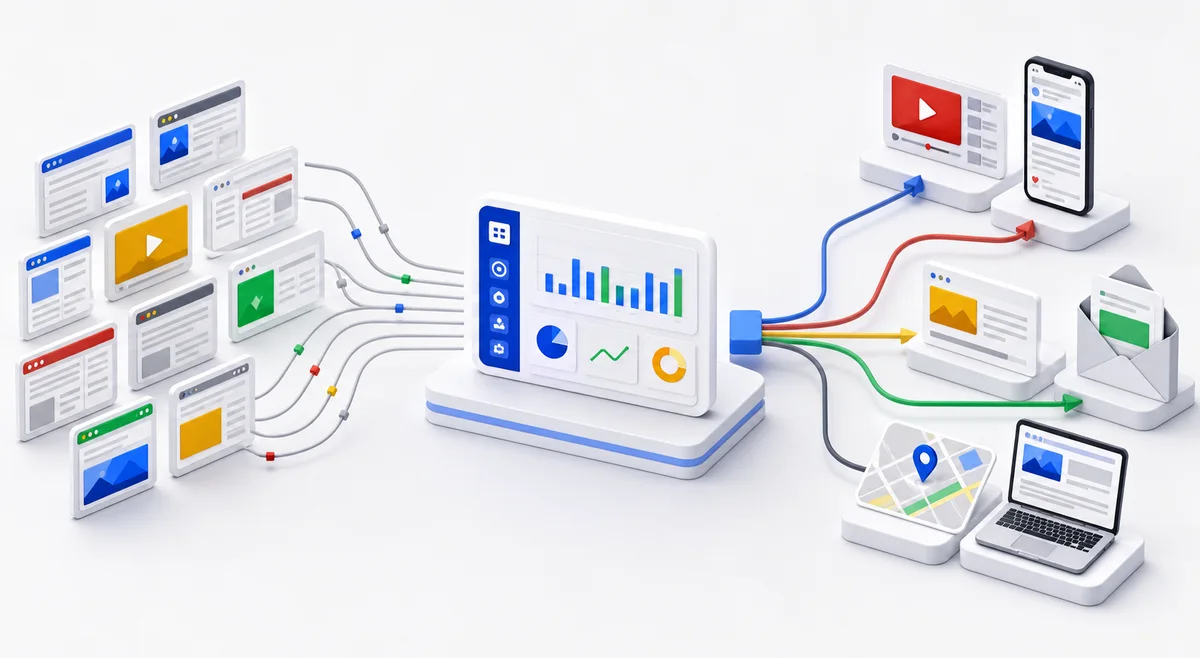
What Demand Gen is
Demand Gen is Google’s campaign type designed to generate interest and action across its visual surfaces.
For a complete explanation, comparisons with Search and Performance Max, and guidance on when to test it, read the guide to what Google Demand Gen is.
Demand Gen campaigns can reach users across:
- YouTube
- YouTube Shorts
- Discover
- Gmail
- Google Display Network
By bringing Display into Demand Gen, Google is creating a more unified environment for visual campaigns that can support multiple stages of the customer journey.
Instead of managing a classic Display campaign and a Demand Gen campaign separately, advertisers can use a broader system with access to more formats, audience signals, and channel controls.
What Google confirmed
According to Google’s official announcement:
- Google Display Network activity can be managed directly through Demand Gen
- advertisers can continue serving exclusively on GDN
- Demand Gen provides channel controls to adjust distribution
- the transition is expected to be completed by 2027
- Google will provide a migration tool and further guidance
Google also reports that advertisers adding GDN to Demand Gen campaigns see an average 9.5% increase in ROI.
That figure needs context. It is a Google-reported average, not a guaranteed outcome for every account, industry, or budget. Actual performance depends on the offer, audiences, creative assets, tracking, bidding strategy, and landing page quality.
What the change does not mean
The announcement does not mean you should immediately stop every existing Display campaign.
It also does not mean:
- Demand Gen will automatically improve every campaign
- all existing settings will behave identically after migration
- creative that works on Display will perform equally well on YouTube or Discover
- automation can compensate for weak tracking
- wider budget distribution will automatically produce better customers
Demand Gen may create more opportunities, but it also introduces more variables. As the system gains more freedom, correct goals, reliable data, and active review become more important.
Why Google is making this change
Customer behavior is no longer limited to classic searches and banner impressions on websites.
People discover products and services through YouTube Shorts, compare options, read recommendations, browse Discover, and engage with visual content before making a direct search.
Google positions Demand Gen as a campaign environment designed for this fragmented journey.
The potential benefit for advertisers is access to more channels from one campaign. The risk is losing clarity about which channel, audience, or creative asset produced the result.
That is why migration should be managed as a strategic change, not merely an interface update.
First step: document current performance
Before changing or migrating Display campaigns, create a clear record of current performance.
Export data for a meaningful period and document:
- daily budgets and total spend
- cost per conversion
- conversion value
- ROAS, where relevant
- conversion rate
- active audiences
- remarketing lists
- high-performing placements
- excluded placements
- device performance
- impression frequency
- active creative assets
Without this baseline, you will not know whether migration improved performance or simply changed traffic distribution.

For more context, read the guide to what businesses should measure in digital marketing campaigns.
Audit conversion tracking before migration
An automated campaign optimizes using the data you provide.
If a conversion is configured incorrectly, Demand Gen may efficiently optimize toward the wrong outcome.
Before migration, verify:
- which actions are marked as primary conversions
- whether forms are recorded only once
- whether phone calls are tracked correctly
- whether conversion values reflect real business value
- whether old or duplicate conversions remain active
- whether tracking works correctly after cookie consent
- whether offline conversion imports are accurate
For a service business, a submitted form is not always a qualified lead. If every form submission has the same value, the system may optimize for volume rather than commercial opportunity.
Review audiences and exclusions
Display campaigns are often used for remarketing, while Demand Gen can also support new-customer acquisition.
Before migration, clearly separate:
- previous website visitors
- existing customers
- existing leads
- high-intent audiences
- broad prospecting audiences
Review exclusions as well. If existing customers are not excluded from a new-customer campaign, budget may be spent reaching people who have already purchased.
Do not combine every audience into one group simply because the platform allows it. Campaign structure should reflect the business objective.
Prepare creative for each surface
A banner that works on a Google Display Network website is not automatically suitable for YouTube Shorts, Discover, or Gmail.
Demand Gen requires a more visual approach. Prepare assets in multiple formats:
- landscape images
- square images
- vertical images
- short video
- clear headlines
- offer-specific descriptions
- clean logos
- relevant calls to action
Creative should quickly explain:
- what you offer
- who the offer is for
- the concrete benefit
- what the user should do next
Avoid generic claims such as “complete solutions for your business” when users cannot immediately understand the product, service, or benefit.

Review the landing page
Demand Gen can generate traffic, but the landing page must turn interest into action.
Before increasing budgets, check:
- whether the page loads quickly on mobile
- whether the offer is clear above the fold
- whether the call to action is visible
- whether the form asks only for necessary information
- whether the page includes proof, examples, or testimonials
- whether the message is consistent with the ad
- whether tracking works correctly
If an ad promotes a specific offer but sends users to a generic homepage, conversion performance may suffer.
Read the comparison of landing pages versus homepages for paid ads when choosing the destination.
Use channel controls
One important advantage mentioned by Google is the ability to control which channels Demand Gen campaigns use.
This means advertisers can test GDN without automatically distributing budget across every available surface.
A cautious approach would be:
- Start with the goal and channels you already understand.
- Keep a separate testing budget.
- Add new channels gradually.
- Compare results using conversions and value, not only clicks.
- Expand budgets only after collecting enough data.
Channel controls are useful, but they should be reviewed regularly. Platform settings, automated recommendations, and distribution behavior can evolve.
Do not accept every recommendation automatically
Google Ads will continue suggesting automation, expansion, and campaign changes.
Some recommendations may be useful. Others may increase spending without improving the outcome that matters to the business.
Before accepting a recommendation, ask:
- Which goal does it optimize?
- Which setting will it change?
- Will it expand distribution?
- Will it change the audience?
- Will it affect the budget?
- How will the result be measured?
- Can the previous configuration be restored easily?
This is the same principle explained in the article about why businesses should not blindly trust recommended Google Ads and Meta Ads settings.
Practical migration checklist
Use this checklist before moving a Display campaign into Demand Gen:
- Export existing campaign reports.
- Save campaign settings, audiences, and exclusions.
- Audit all primary conversions.
- Remove duplicate or irrelevant conversions.
- Confirm conversion values.
- Prepare creative for multiple visual formats.
- Review landing pages and mobile experience.
- Set a separate testing budget.
- Use channel controls.
- Compare results against the baseline period.
- Review lead quality, not only lead volume.
- Expand gradually.
How to analyze results after migration
Do not judge the migration after the first two days.
Automated campaigns need data, and initial performance can fluctuate. That does not mean the campaign should run indefinitely without review.
Monitor:
- spend by channel
- conversions and conversion value
- cost per conversion
- lead quality
- creative performance
- audience frequency and saturation
- differences between prospecting and remarketing
- landing page results
Define intervention thresholds before the test starts. For example, if a campaign spends a certain amount without generating relevant conversions, it should be reviewed even if the platform recommends waiting longer.
What this means for small businesses
For a small business, unifying Display and Demand Gen may simplify campaign management. It can also provide easier access to YouTube, Discover, and other visual surfaces.
However, a simpler interface does not remove the need for strategy.
Small businesses need to be especially careful about:
- goals
- budgets
- conversions
- geographic targeting
- audiences
- messaging
- landing pages
- lead quality
When budgets are limited, every automated expansion needs to be justified by business results.
Final takeaway
The move from Google Display Ads into Demand Gen is important, but it is not a reason to rush migration.
Google’s direction is clear: more visual channels, more automation, and unified campaign management. The opportunity for advertisers is access to more surfaces and tools. The risk is losing control over measurement and budget distribution.
Proper preparation means:
- documenting current performance
- auditing tracking
- cleaning audiences and exclusions
- preparing suitable creative
- using channel controls
- testing gradually
- analyzing real business outcomes
The platform is changing. The principle remains the same: automation must be controlled by goals and data, not the other way around.
Need help with Google Ads and Demand Gen?
At CloudStack Solutions, we build digital marketing campaigns with reliable tracking, clear landing pages, and optimization focused on real business outcomes.
Explore our Digital Marketing services or read the guide to choosing the right digital marketing channel in 2026.