
Google finally added AI visibility data to Search Console
On June 3, 2026, Google announced new Search Generative AI performance reports in Google Search Console.
This is important because, until now, site owners could see overall Search performance, but they could not separate visibility inside Google’s generative AI features in a clean way. If a page appeared in AI Overviews or AI Mode, that visibility was not easy to isolate from normal Search data.
The new reports are designed to show how often URLs from your site appear in Google’s generative AI features.
Google says the reports include dedicated views for:
- generative AI features on Search, such as AI Overviews and AI Mode
- generative AI features in Google Discover
This is not a full solution for measuring AI search performance, but it is a meaningful step. For the first time, many website owners will have a Search Console view focused specifically on visibility in Google’s AI-driven search surfaces.
Google’s announcement is here: Introducing Search Generative AI performance reports in Search Console.
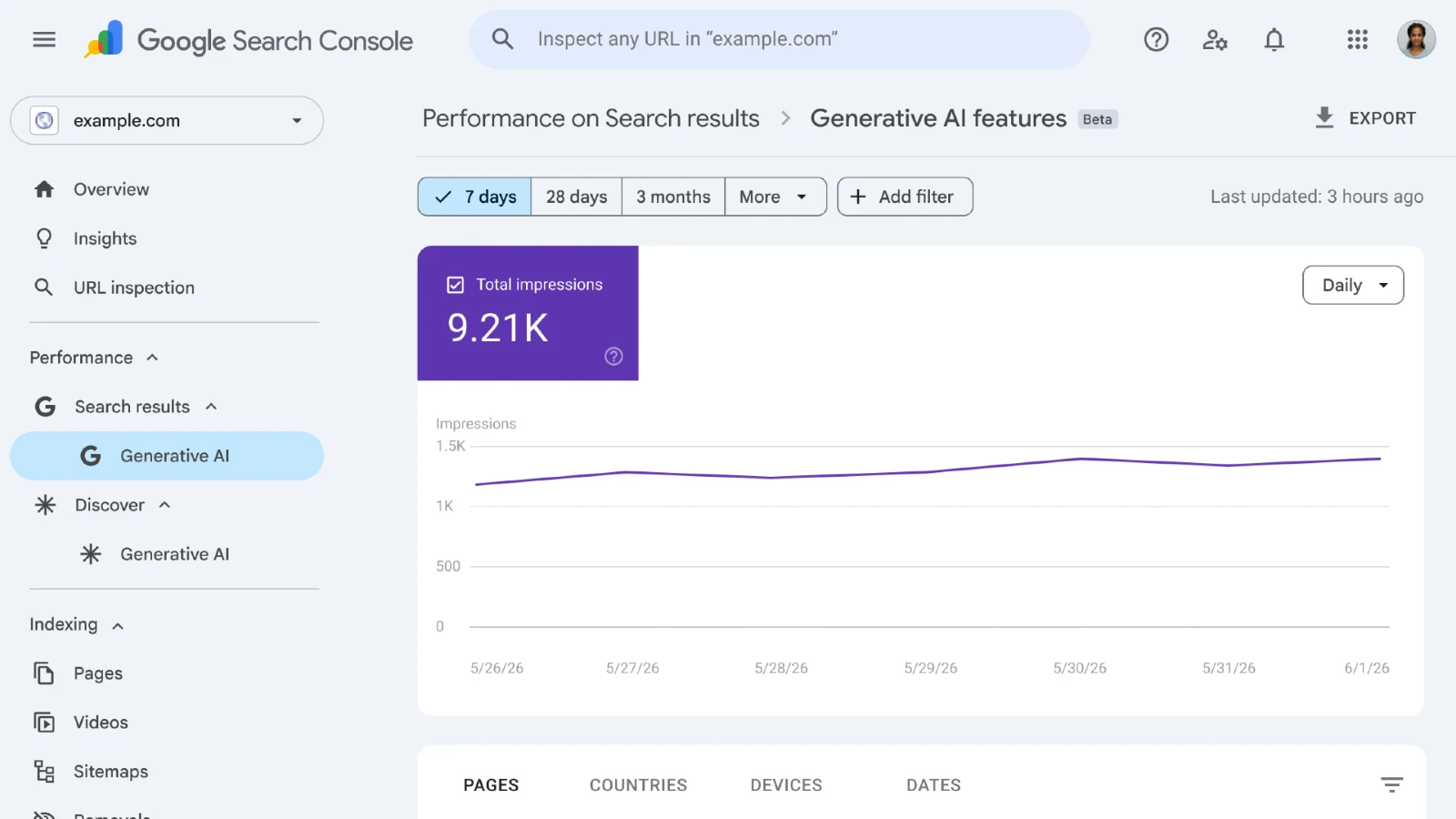
Screenshot of Google’s Generative AI features report in Search Console.
What the new report shows
The most important metric is impressions.
In plain language, the report shows how often URLs from your website appeared in generative AI features. It can help answer questions such as:
- Did our pages appear in AI Overviews or AI Mode?
- Which pages appeared most often?
- In which countries did those impressions happen?
- On which devices did users see those results?
- How did AI visibility change over time?
For the Search report, Google lists the following dimensions:
- Pages
- Countries
- Devices
- Dates
For Discover, the report focuses on pages, countries, and dates.
That means you can start looking at AI visibility in a more practical way. You can compare pages, spot countries where your content appears more often, and see whether visibility grows or drops after content changes, algorithm updates, or major Google Search changes.
What the report does not show
This is where expectations need to stay realistic.
The new Generative AI performance reports are not the same as normal SEO reporting. They are mainly visibility reports.
At launch, the core metric is impressions. That means the report can help you understand exposure, but it does not fully answer questions like:
- How many users clicked from AI Overviews?
- How many leads came from AI Mode?
- Which exact AI answer included our page?
- Was our brand cited positively or just listed as a source?
- Did the generated answer reduce or increase clicks?
This matters because AI search creates a different measurement problem.
In classic search, the path is easier to understand: query, result, click, page, conversion. In AI search, the user may read a generated answer, compare sources, continue the conversation, click later, or never click at all.
So the new report is useful, but it should not be treated as a complete AI search dashboard.
Why some websites will not see the report yet
Google says the reports are rolling out to a subset of websites first. The reason is testing and feedback before wider availability.
If you do not see the report in Search Console, there are a few likely reasons:
- the property does not have access yet
- the site has not received enough impressions in generative AI features
- the site may not be eligible for those features
- the relevant data has not accumulated yet
This is important for smaller business websites. Not seeing the report immediately does not automatically mean your SEO is broken. It may simply mean the feature has not rolled out to your property or there is not enough AI visibility data yet.
The practical approach is to check Search Console periodically, but not panic if the report is missing.
How this changes SEO reporting
The biggest change is that AI visibility becomes easier to discuss with data.
Until now, many conversations about AI search were based on manual checks, screenshots, third-party tools, and speculation. Those can still be useful, but they are not the same as first-party data from Search Console.
With this report, SEO analysis can start separating a few different questions:
- Are we visible in classic organic search?
- Are we visible in AI Overviews and AI Mode?
- Are the same pages visible in both places?
- Do informational pages appear more often than service pages?
- Is AI visibility growing while clicks stay flat?
- Are certain countries or devices more exposed to generative AI results?
Those questions are more useful than simply asking “are we optimized for AI?”.
For a business website, the difference matters. A service page may rank well in classic results but rarely appear in AI surfaces. An educational article may appear often in AI results but not generate direct leads. A comparison page may become more valuable because generative AI systems can use it as structured source material.
The report will not answer everything, but it gives you a better starting point.
Do AI impressions mean success?
Not automatically.
An AI impression means your URL appeared in a generative AI feature. That is useful visibility, but it is not the same as business impact.
A page can get many AI impressions and still produce no leads. Another page can get fewer impressions but attract better visitors. A third page can appear in AI results because it answers a broad informational question, while the commercial page that actually converts users stays invisible.
So I would not report AI impressions as a standalone win.
A better interpretation is:
- AI impressions show potential visibility
- page-level data shows which content Google can use in AI features
- country and device data show where that visibility appears
- normal Search Console and Analytics data still show traffic and conversions
- manual review still matters for understanding answer quality and context
In other words, AI impressions are a signal, not the final result.
What businesses should check first
If you get access to the report, I would start with a simple review.
Do not overcomplicate it on day one.
Start with:
- Which pages receive the most AI impressions?
- Are those pages important for the business?
- Are they informational, commercial, local, or support pages?
- Do they link clearly to relevant service pages?
- Do they answer the topic better than competing pages?
- Do they show trust, experience, examples, and useful structure?
- Do they also perform in normal Search results?
This helps you avoid a common mistake: celebrating AI visibility on pages that do not support the business.
If a blog post appears often in AI Overviews, that is useful only if the page helps the user move forward: read a related guide, visit a service page, contact the company, download something, or understand why your business is relevant.
Visibility without a path is weak.
How to improve pages for AI visibility
The new report does not create a new magic checklist. It makes the old quality problem easier to measure.
Pages that have a better chance in generative AI search usually share a few traits:
- they answer the main question directly
- they use clear headings
- they explain terms without fluff
- they include examples
- they cover related questions naturally
- they show experience and credibility
- they are easy to crawl and index
- they connect to relevant internal pages
This overlaps with good SEO, AEO, and GEO.
For more context, read the guide about what AEO is and how to optimize your site for AI answers and the article about GEO for generative search visibility.
The important part is not to write generic “AI optimized” content. The goal is to create pages that are clear enough for systems to understand and useful enough for people to trust.
How I would use the report after a Google update
This report becomes especially useful after core updates or major AI Search changes.
For example, after the May 2026 Core Update, many site owners looked at clicks, impressions, and average position in Search Console. With Generative AI performance reports, you can add another layer:
- Did classic Search visibility drop, but AI visibility increase?
- Did both classic and AI visibility drop?
- Did certain pages lose normal rankings but still appear in AI features?
- Did informational content become more visible than commercial pages?
- Did visibility change only in certain countries?
This can help separate a traffic problem from a visibility problem.
If clicks drop but AI impressions grow, the issue may not be that Google stopped understanding your site. It may be that the search experience changed and users need fewer clicks for certain queries.
That does not make the drop harmless, but it changes how you analyze it.
For update analysis, also read the article about the Google May 2026 Core Update and what businesses should do.
What to avoid
The worst reaction is to turn the report into another vanity metric.
I would avoid:
- reporting AI impressions without context
- rewriting every article just to chase AI visibility
- assuming no report means no opportunity
- treating AI impressions as leads
- ignoring normal SEO traffic and conversions
- creating generic FAQ pages only for AI extraction
- blocking AI features without understanding the tradeoff
The report should support better decisions, not replace judgment.
Final takeaway
Google’s new Search Generative AI performance reports are a serious signal: AI visibility is becoming part of normal SEO analysis.
But the practical conclusion is balanced.
The report helps you see where your site appears in generative AI features. It does not fully explain clicks, leads, conversions, brand perception, or answer quality.
For businesses, the right response is not panic and not hype. It is a better measurement process:
- track AI impressions
- compare them with normal Search performance
- identify which pages appear
- improve weak content
- strengthen internal links
- make service paths clearer
- keep measuring real business outcomes
AI search changes reporting, but it does not change the basic goal: your website still needs to be clear, useful, trustworthy, and connected to measurable business actions.
Need help interpreting Search Console data?
At CloudStack Solutions, we help businesses understand Search Console data, technical SEO, content structure, AI search visibility, and conversion paths.
Explore our SEO services or start with an SEO audit for your website.